


 Simple and fast payment
 Discount Coupons
 Easy order tracking
 Personalized shopping
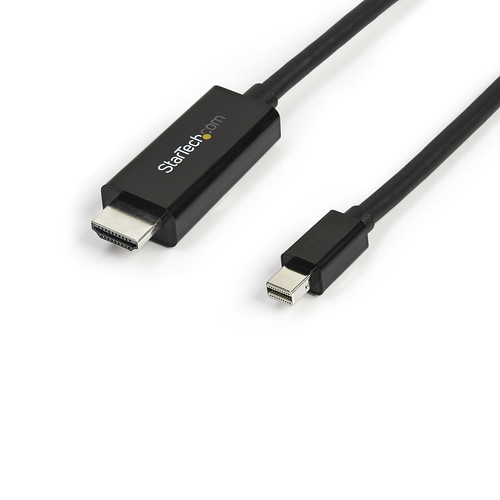

Καλώδιο HDMI StarTech Mdp To - 4K 30Hz
εως 36 δόσεις με πιστωτική κάρτα

Need Help? Fill in your details so we can call you immediately!
Έως 36 Δόσεις. Δείτε το πλάνο δόσεων:
TBI Bank
Buy Now Pay Later.

4 installments 0% επιτόκιο, 20€ έως 300€
3 to 60 installments 300€ έως 100.00€
- 1. Ship with ACS Courier
- 2. Αποστολές με μεταφορικές εταιρίες για ογκώδη αντικείμενα
-
3. Pickup from BoxNow automated machine:
Με την BoxNow μπορείς να παραλάβεις το δέμα σου από Αυτόματο Μηχάνημα Παραλαβής που βρίσκεται κοντά σου, όλες τις ώρες της ημέρας 24/7. Η υπηρεσία έχει χρέωση 3€. Υπάρχει δυνατότητα αντικαταβολής με επιπλέον χρέωση 1€.
-
4. Pickup from the store:
Leof. El. Venizelou 73 (former Theseos), Kallithea
Συμπληρώστε τον ταχυδρομικό κωδικό για να λάβετε εκτίμηση τρόπου και κόστους μεταφορικών.
The MDP to HDMI Cable - 4K 30Hz (MPN: MDP2HDMM3MB) is a high-quality passive adapter cable designed to convert Mini DisplayPort signals to HDMI. It supports resolutions up to 4K at 30Hz.
### Product Overview
The MDP to HDMI Cable - 4K 30Hz is an ideal solution for connecting devices equipped with Mini DisplayPort, such as MacBooks and Microsoft Surface Pro, to HDMI displays or projectors. This adapter cable ensures a seamless and clutter-free installation.
### Technical Specifications
- Resolution Support: Up to 4K (3840 x 2160) at 30Hz, backward compatible with lower resolutions like 1080p and 720p.
- Audio Support: Supports uncompressed digital audio channels - 7.1, 5.1, or stereo.
- HDCP and HDR Support: Compatible with HDCP 2.0 and HDR for streaming services like Ultra HD Netflix.
- Compatibility: Works with Mini DisplayPort-equipped devices, including Thunderbolt 1 and 2.
- Length and Color: Cable length of 3 meters (10 feet), available in black.
- Connector Type: Mini DisplayPort Male to HDMI Male connector.
- Power Requirements: Passive adapter, powered directly from the Mini DisplayPort source.
- Compliance: Compliant with DisplayPort 1.2, CE, RoHS, and FCC standards.
### Installation and Setup
The installation process is straightforward and plug-and-play. Follow these steps:
- Connect the Mini DisplayPort end to your device.
- Connect the HDMI end to your display.
- Adjust your display settings to recognize the HDMI input.
- Set your audio output to the HDMI display.
This adapter cable ensures stable transmission of both audio and video signals.
-
Resolution SupportUp to 4K (3840 x 2160) at 30Hz, backward compatible with lower resolutions
-
Audio SupportUncompressed digital audio channels - 7.1, 5.1, or stereo
-
HDCP and HDR SupportCompatible with HDCP 2.0 and HDR
-
CompatibilityMini DisplayPort-equipped devices, including Thunderbolt 1 and 2
-
Length3 meters (10 feet)
-
ColorBlack
-
Connector TypeMini DisplayPort Male to HDMI Male
-
Power RequirementsPassive adapter, powered directly from Mini DisplayPort source
-
ComplianceCompliant with DisplayPort 1.2, CE, RoHS, and FCC standards
Ratings
Description
The MDP to HDMI Cable - 4K 30Hz (MPN: MDP2HDMM3MB) is a high-quality passive adapter cable designed to convert Mini DisplayPort signals to HDMI. It supports resolutions up to 4K at 30Hz.
### Product Overview
The MDP to HDMI Cable - 4K 30Hz is an ideal solution for connecting devices equipped with Mini DisplayPort, such as MacBooks and Microsoft Surface Pro, to HDMI displays or projectors. This adapter cable ensures a seamless and clutter-free installation.
### Technical Specifications
- Resolution Support: Up to 4K (3840 x 2160) at 30Hz, backward compatible with lower resolutions like 1080p and 720p.
- Audio Support: Supports uncompressed digital audio channels - 7.1, 5.1, or stereo.
- HDCP and HDR Support: Compatible with HDCP 2.0 and HDR for streaming services like Ultra HD Netflix.
- Compatibility: Works with Mini DisplayPort-equipped devices, including Thunderbolt 1 and 2.
- Length and Color: Cable length of 3 meters (10 feet), available in black.
- Connector Type: Mini DisplayPort Male to HDMI Male connector.
- Power Requirements: Passive adapter, powered directly from the Mini DisplayPort source.
- Compliance: Compliant with DisplayPort 1.2, CE, RoHS, and FCC standards.
### Installation and Setup
The installation process is straightforward and plug-and-play. Follow these steps:
- Connect the Mini DisplayPort end to your device.
- Connect the HDMI end to your display.
- Adjust your display settings to recognize the HDMI input.
- Set your audio output to the HDMI display.
This adapter cable ensures stable transmission of both audio and video signals.
Technical Specifications
-
Resolution SupportUp to 4K (3840 x 2160) at 30Hz, backward compatible with lower resolutions
-
Audio SupportUncompressed digital audio channels - 7.1, 5.1, or stereo
-
HDCP and HDR SupportCompatible with HDCP 2.0 and HDR
-
CompatibilityMini DisplayPort-equipped devices, including Thunderbolt 1 and 2
-
Length3 meters (10 feet)
-
ColorBlack
-
Connector TypeMini DisplayPort Male to HDMI Male
-
Power RequirementsPassive adapter, powered directly from Mini DisplayPort source
-
ComplianceCompliant with DisplayPort 1.2, CE, RoHS, and FCC standards


